Note
Go to the end to download the full example code.
Errors: field-based with angles
In this example we demonstrate how to setup vector field sensors at custom orientations with respect to the simulation coordinate system. We first build a sensor array aligned with the simulation coords in the same way as the previous example. We then build a sensor array with the sensors rotated and compare this to the case with no rotation.
1. Load physics simulation data
data_path: Path = dataset.mechanical_2d_path()
sim_data: io.SimData = mh.ExodusLoader(data_path).load_all_sim_data()

disp_keys = ("disp_x","disp_y")
strain_keys = ("strain_xx","strain_yy","strain_xy")

sim_data: io.SimData  = sens.scale_length_units(scale=1000.0,
                                                sim_data=sim_data,
                                                disp_keys=disp_keys)
2. Build virtual sensor arrays
sim_dims: dict[str,tuple[float,float]] = sens.simtools.get_sim_dims(sim_data)
sens_pos: np.ndarray = sens.gen_pos_grid_inside(num_sensors=(2,2,1),
                                                x_lims=sim_dims["x"],
                                                y_lims=sim_dims["y"],
                                                z_lims=(0.0,0.0))

sample_times: np.ndarray = np.linspace(0.0,np.max(sim_data.time),50)

sens_angles_norot: tuple[Rotation] = (
    Rotation.from_euler("zyx",[0,0,0], degrees=True),
)

sens_data_norot = sens.SensorData(positions=sens_pos,
                                  sample_times=sample_times,
                                  angles=sens_angles_norot)


sens_array_norot: sens.SensorsPoint = sens.SensorFactory.vector_point(
    sim_data,
    sens_data_norot,
    comp_keys=disp_keys,
    spatial_dims=sens.EDim.TWOD,
    descriptor=sens.DescriptorFactory.displacement(),
)
To create our sensor array with rotated sensors we need to add a tuple of scipy rotation objects to our sensor data class. This tuple must be the same length as the number of sensors in the sensor array. Note that it is also possible to specify a single rotation in the tuple in this case all sensors are assumed to have the same rotation and they are batch processed to increase speed. Here we will define our rotations to all be the same rotation in degrees about the z axis which is the out of plane axis for our current test case.
sens_rot_deg: float = 90.0
sens_angles_rot = sens_pos.shape[0] * \
    (Rotation.from_euler("zyx",[sens_rot_deg,0,0],degrees=True),)

# We could have also use a single element tuple to have all sensors have the
# angle and batch process them:
sens_angles_rot = (Rotation.from_euler("zyx",[sens_rot_deg,0,0],degrees=True),)

sens_data_rot = sens.SensorData(positions=sens_pos,
                                sample_times=sample_times,
                                angles=sens_angles_rot)

sens_array_rot: sens.SensorsPoint = sens.SensorFactory.vector_point(
    sim_data,
    sens_data_rot,
    comp_keys=disp_keys,
    spatial_dims=sens.EDim.TWOD,
    descriptor=sens.DescriptorFactory.displacement(),
)
2.1. Add simulated measurement errors
We can also use a field error to add uncertainty to the sensors angle. We can apply a specific offset to each sensor or provide a random generator to perturb the sensors orientation. Note that the offset and the random generator should provide the perturbation in degrees.
angle_offset_zyx = np.zeros_like(sens_pos)
angle_offset_zyx[:,0] = 2.0 # only rotate about z in 2D
angle_rand_zyx = (sens.GenUniform(low=-2.0,high=2.0),None,None)
angle_error_data = sens.ErrFieldData(ang_offset_zyx=angle_offset_zyx,
                                     ang_rand_zyx=angle_rand_zyx)

err_chain_norot: list[sens.IErrSimulator] = [
    sens.ErrSysField(sens_array_norot.get_field(),angle_error_data),
]
sens_array_norot.set_error_chain(err_chain_norot)


err_chain_rot: list[sens.IErrSimulator] = [
    sens.ErrSysField(sens_array_rot.get_field(),angle_error_data),
]
sens_array_rot.set_error_chain(err_chain_rot)
3. Create & run simulated experiment
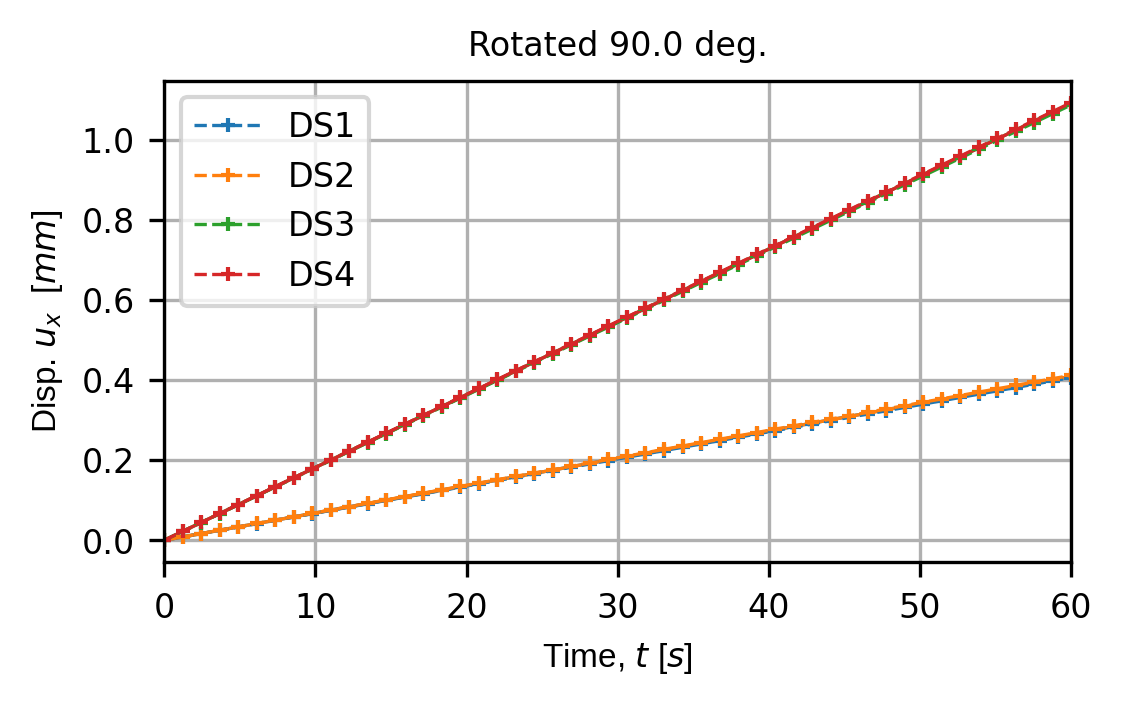
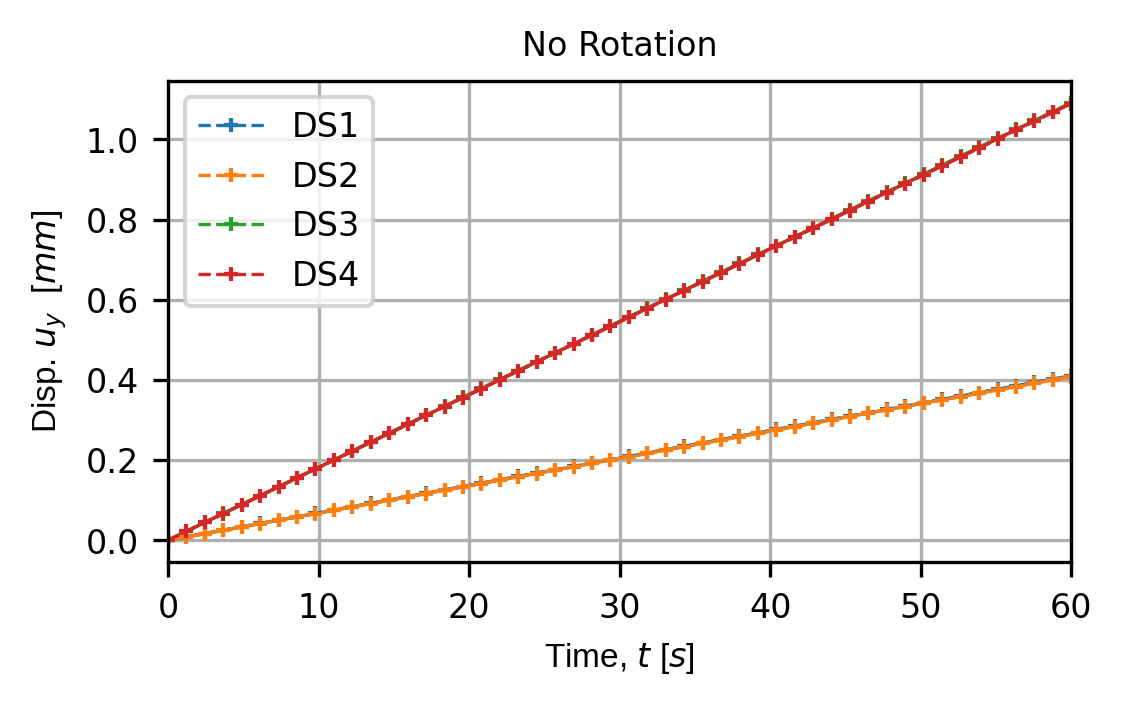
When we print the measurements here we should see that the truth for the rotated and non-rotated cases is the same. This is because we have rotated the sensors 90 degrees, which means the x (component=0) of the non-rotated case should be the same as the y (component=1) for the rotated case.
meas_rot = sens_array_rot.sim_measurements()
meas_norot = sens_array_norot.sim_measurements()

print(80*"-")

sens_print: int = 0
comp_print: int = 0
time_last: int = 5
time_print = slice(meas_norot.shape[2]-time_last,meas_norot.shape[2])

print("DISP. SENSORS: NO ROTATION")
sens.print_measurements(sens_array_norot,sens_print,comp_print,time_print)

comp_print = 1
print("\nDISP. SENSORS: ROTATED")
sens.print_measurements(sens_array_rot,sens_print,comp_print,time_print)

print(80*"-")
4. Analyse & visualise the results
output_path = Path.cwd() / "pyvale-output"
if not output_path.is_dir():
    output_path.mkdir(parents=True, exist_ok=True)


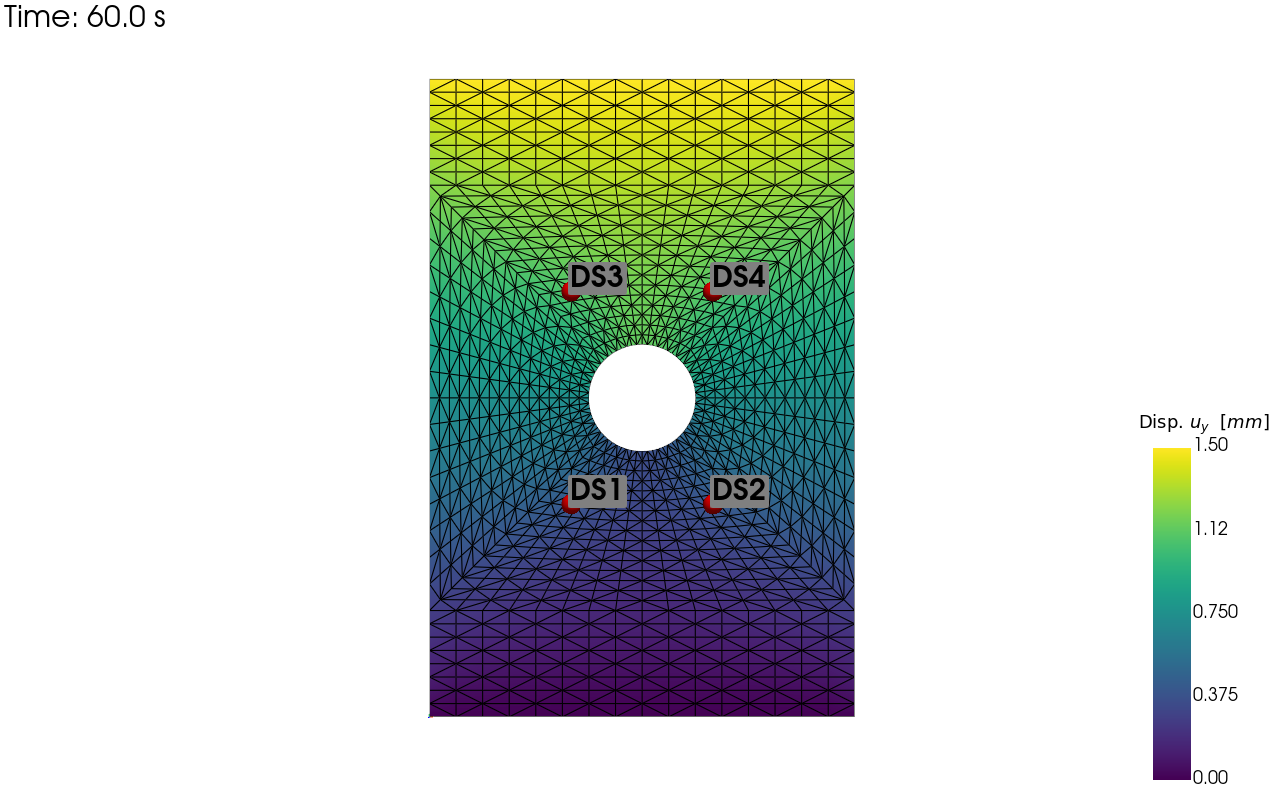
pv_plot = sens.plot_point_sensors_on_sim(sens_array_norot,
                                         comp_key="disp_y")
pv_plot.camera_position = "xy"

# Set to False to show an interactive plot instead of saving the figure
pv_plot.off_screen = True
if pv_plot.off_screen:
    pv_plot.screenshot(output_path/"ext_ex4c_locs.png")
else:
    pv_plot.show()
Virtual sensor locations:
# We can now plot the traces for the non-rotated and rotated sensors to
# compare them:

for ff in disp_keys:
    (fig,ax) = sens.plot_time_traces(sens_array_norot,ff)
    ax[0].set_title("No Rotation")

    save_traces = output_path/f"ext_ex4c_traces_norot_{ff}.png"
    fig.savefig(save_traces, dpi=300, bbox_inches="tight")

    (fig,ax) = sens.plot_time_traces(sens_array_rot,ff)
    ax[0].set_title(f"Rotated {sens_rot_deg} deg.")

    save_traces = output_path/f"ext_ex4c_traces_rot_{ff}.png"
    fig.savefig(save_traces, dpi=300, bbox_inches="tight")

# Uncomment to show trace plots interactively
# plt.show()
Non-rotated sensors, y displacement:
Rotated sensors, x displacement: