Note
Go to the end to download the full example code.
Riley: Speckle sphere
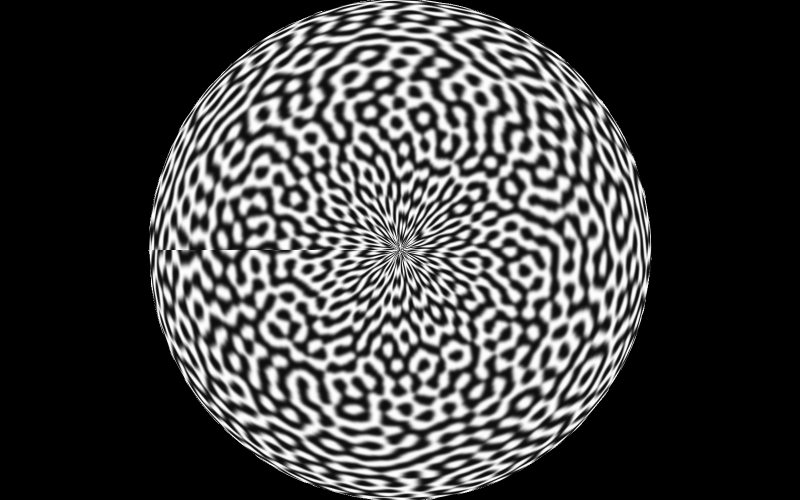
Here we render a sphere mesh of TRI6 elements with a speckle pattern texture shader.
Texture shaders use a 2D image and wrap this around a 3D object using normalised coordinates called UVs in computer graphics. The texture shader itself then uses these UV coordinates to map into and interpolate the colour for a pixel.
The quality of the reconstruction is dependent on the resolution of the texture relative to the final camera image size, the texture sampling function and the pixel integration parameters (i.e. pixel subsampling).
It is common to want to map a speckle pattern onto a 3D surface using UV coordinates for digital image correlation simulation. We provide a set of examples on UV mapping for common cases in the “Render UVs” example gallery.
There are also much more advanced tools for UV mapping in Blender if you require them.
1. Load the mesh and assign a texture shader
data_dir: Path = riley.data.sphere200_case_path()

simulation = io.MeshLoader(
    load_dir=data_dir,
    coords_file="coords.csv",
    connect_files="connect.csv",
    load_opts=io.SimLoadOpts(coord_header=None),
).load_mesh()

uvs = io.load_array(data_dir / "uvs.csv", header=None, delimiter=",")

texture = riley.load_texture_mono_u8(riley.data.speckle_texture_path())

shader = riley.TextureShader(uvs=uvs, texture=texture)

mesh = render.meshes3d_from_simdata(
    simulation,
    {"connect": riley.ConnectConvention(
        riley.EElemType.TRI6, riley.EConnectAxis.ROW, 0,
        riley.ENodeOrder.RILEY,
    )},
    shaders={"connect": shader},
)["connect"]
2. Create and position the camera
pixels_num = np.array((800, 500))
pixels_size = np.array((5.3e-6, 5.3e-6))
focal_length = 50.0e-3
rotation = Rotation.identity()

camera = render.Camera(
    pixels_num=pixels_num,
    pixels_size=pixels_size,
    pos_world=np.zeros(3),
    rot_world=rotation,
    roi_cent_world=np.zeros(3),
    focal_length=focal_length,
    subsample=4,
)

camera = render.cam_frame_mesh(camera, mesh, fov_scale=1.0)
3. Configure and build the renderer
config = riley.RasterConfig(
    parallel=4,
    save_strategy=riley.SaveStrategy.disk,
    image_save_mode=riley.ImageSaveMode.grey,
    save_scaling=riley.ScaleStrategy.auto,
)
output_dir = Path.cwd() / "pyvale-output" / "render3d_ex1b_riley_sphere200"

renderer = render.Riley(config, output_dir)
4. Build the scene and render it
scene = render.Scene3D(meshes=[mesh], cameras=[camera])
result = renderer.render(scene)

print(f"Rendered sphere render output to {output_dir}")
print(f"{result.images=}")
The first rendered frame is shown below.