Note
Go to the end to download the full example code.
Riley: Multi Shader, Multi Element Rabbits
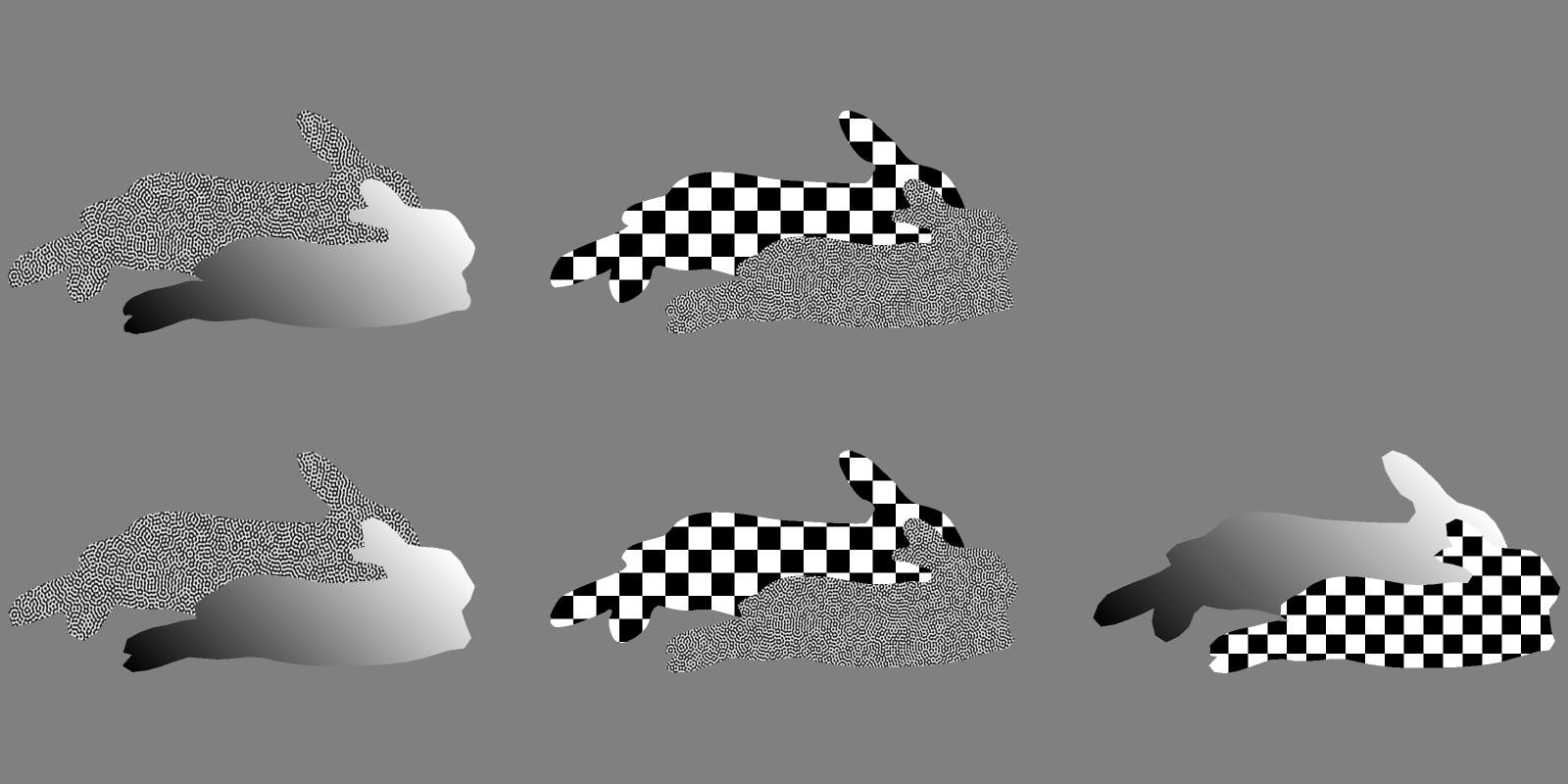
Here we render a series of rabbit meshes of all different element types cycling through all supported shaders for Riley to show how to build a scene with mixed element and shader types.
from pathlib import Path

import numpy as np
import riley
from riley import sceneops
from scipy.spatial.transform import Rotation

import pyvale.dataio as io
from pyvale import render


def load_rabbit(
    rabbit: str,
    topology: render.EElemType,
) -> tuple[io.SimData, np.ndarray]:
    """Load one static rabbit mesh and its UV coordinates."""
    data_dir = riley.data.rabbit_case_path(rabbit, topology.value)

    simulation = io.MeshLoader(
        load_dir=data_dir,
        coords_file="coords.csv",
        connect_files="connectivity.csv",
        load_opts=io.SimLoadOpts(coord_header=None),
    ).load_mesh()

    uvs = io.load_array(data_dir / "uvs.csv", header=None, delimiter=",")

    return simulation, uvs
1. Load several mesh topologies and assign different shaders
topologies = (
    render.EElemType.TRI3,
    render.EElemType.TRI6,
    render.EElemType.QUAD4,
    render.EElemType.QUAD8,
    render.EElemType.QUAD9,
)

texture = riley.load_texture_mono_u8(riley.data.speckle_texture_path())

meshes: list[render.Mesh3D] = []
mesh_groups: list[sceneops.SceneMeshGroup] = []

for topology_index, element_type in enumerate(topologies):
    pair_start = len(meshes)
    for rabbit_name in ("riley", "feebs"):
        simulation, uvs = load_rabbit(rabbit_name, element_type)
        shader_index = len(meshes) % 3

        if shader_index == 0:
            shader = riley.TextureShader(uvs=uvs, texture=texture)
        elif shader_index == 1:
            nodal_field = 0.5 * (uvs[:, 0] + uvs[:, 1])
            shader = riley.NodalShader(
                field=nodal_field[:, None],
                scaling_type=riley.ScaleStrategy.auto,
            )
        else:
            shader = riley.FunctionShader(
                builtin=riley.FuncShaderBuiltin.checker,
                coord_mode=riley.FuncCoordMode.uv,
                params=riley.FuncShaderParams(coord_scale=(36.0, 36.0)),
                uvs=uvs,
                scaling_type=riley.ScaleStrategy.auto,
            )

        mesh = render.meshes3d_from_simdata(
            simulation,
            {"connectivity": riley.ConnectConvention(
                element_type, riley.EConnectAxis.ROW, 0,
                riley.ENodeOrder.RILEY,
            )},
            shaders={"connectivity": shader},
        )["connectivity"]

        if mesh.element_type is not element_type:
            raise ValueError(
                f"Unexpected topology loaded for {element_type}."
            )

        meshes.append(mesh)

    mesh_coords = [mesh.coords for mesh in meshes]
    sceneops.scene_overlap_mesh_group_bounds(
        mesh_coords,
        sceneops.scene_create_mesh_group_single(pair_start),
        sceneops.scene_create_mesh_group_single(pair_start + 1),
        sceneops.SceneBoundsOverlapSpec(
            overlap_frac=(0.85, 0.8, 0.0),
            enabled_axes=(True, True, False),
            direct=(
                sceneops.ESceneOverlapDirect.POSITIVE,
                sceneops.ESceneOverlapDirect.NEGATIVE,
                sceneops.ESceneOverlapDirect.CURRENT,
            ),
        ),
    )

    mesh_groups.append(sceneops.scene_create_mesh_group_span(pair_start, 2))

sceneops.scene_arrange_mesh_groups_grid(
    [mesh.coords for mesh in meshes],
    mesh_groups,
    sceneops.SceneGridSpec(gap=(0.18, 0.28, 0.0), max_divs=(3, 2, 1)),
)
2. Create and position a camera around every mesh
pixels_num = np.array((1600, 800))
pixels_size = np.array((5.3e-6, 5.3e-6))
focal_length = 50.0e-3

camera = render.Camera(
    pixels_num=pixels_num,
    pixels_size=pixels_size,
    pos_world=np.zeros(3),
    rot_world=Rotation.identity(),
    roi_cent_world=np.zeros(3),
    focal_length=focal_length,
    subsample=4,
)

camera = render.cam_frame_scene(camera, meshes, fov_scale=1.01)
3. Configure and build the renderer
config = riley.RasterConfig(
    parallel=4,
    save_strategy=riley.SaveStrategy.disk,
)
config.background_value = 127.5
config.image_save_mode = riley.ImageSaveMode.grey
config.save_scaling = riley.ScaleStrategy.none

output_dir = Path.cwd() / "pyvale-output" / "render3d_ex1c_riley_rabbits"

renderer = render.Riley(config, output_dir)
4. Build the multi mesh scene and render it
scene = render.Scene3D(meshes=meshes, cameras=[camera])
result = renderer.render(scene)

print(f"Rendered the rabbit topology comparison to {output_dir}")
print(f"{result.images=}")
The first rendered frame containing all topology variants is shown below.