Note
Go to the end to download the full example code.
Render UVs: Translate, rotate, and scale a mapping
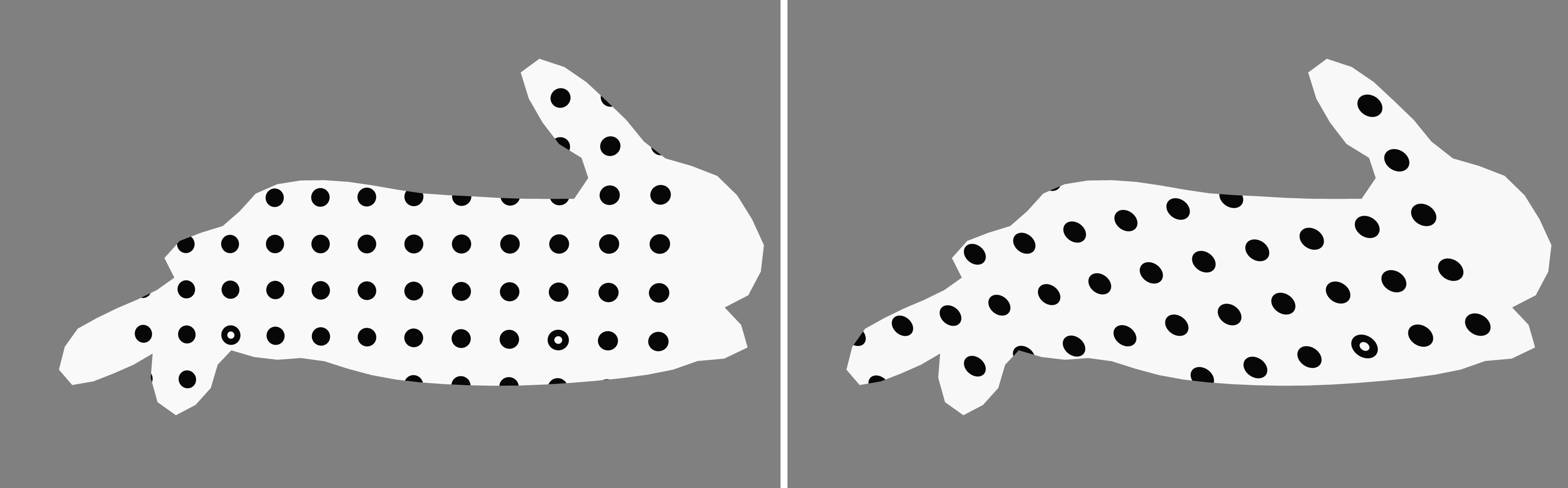
Here we retain the asymmetric Riley rabbit mesh, generate a centred mapping, and apply a combined UV transformation. The physical rabbit is rendered from an oblique view so its three dimensional form remains visible.
1. Load and orient the packaged Riley rabbit mesh
The asymmetric rabbit makes UV rotations and translations easier to recognise than a rectangular plate, so it remains the best mesh for this comparison.
data_dir = riley.data.rabbit_case_path("riley", render.EElemType.QUAD4.value)

simulation = io.MeshLoader(
    load_dir=data_dir,
    coords_file="coords.csv",
    connect_files="connectivity.csv",
    load_opts=io.SimLoadOpts(coord_header=None),
).load_mesh()

base_mesh = render.meshes3d_from_simdata(
    simulation,
    {"connectivity": riley.ConnectConvention(
        riley.EElemType.QUAD4, riley.EConnectAxis.ROW, 0,
        riley.ENodeOrder.RILEY,
    )},
)["connectivity"]

oriented_mesh = render.mesh_rotate(
    base_mesh,
    Rotation.from_euler("xyz", (8.0, -24.0, 0.0), degrees=True),
    pivot=render.mesh_center(base_mesh),
)

texture = riley.load_texture_mono_u8(riley.data.cal_target_texture_path())

camera = render.Camera(
    pixels_num=np.array((1792, 1120)),
    pixels_size=np.array((5.5e-6, 5.5e-6)),
    pos_world=np.zeros(3),
    rot_world=Rotation.identity(),
    roi_cent_world=render.mesh_center(oriented_mesh),
    focal_length=35.0e-3,
    subsample=4,
)

camera = render.cam_frame_mesh(
    camera,
    oriented_mesh,
    fov_scale=render.cam_coverage_to_fov_scale(0.90),
)
2. Fit one calibration target over the rabbit
CONTAIN preserves the calibration texture’s aspect ratio and fits one
complete target inside the rabbit’s planar XY extent. This keeps the grid
legible and avoids repeating the calibration image across the mesh.
original_uvs = render.uv_project_planar(
    oriented_mesh.coords,
    texture_shape=texture.shape[-2:],
    fit=render.EUVFit.CONTAIN,
)
3. Apply a combined transformation
Scaling and rotation happen about the selected pivot. Translation is applied last, and transformed UVs are allowed to extend outside the texture bounds.
transform = render.UVTransform(
    translation=(0.08, -0.04),
    rotation_degrees=18.0,
    scale=(0.85, 0.85),
    pivot=(0.5, 0.5),
)

transformed_uvs = render.uv_transform(original_uvs, transform)
4. Render the original and transformed mappings
output_dir = Path.cwd() / "pyvale-output" / "renderuvs_ex1e_uv_transform"

for variant_name, uvs in (
    ("original", original_uvs),
    ("transformed", transformed_uvs),
):
    textured_mesh = render.Mesh3D(
        element_type=oriented_mesh.element_type,
        coords=oriented_mesh.coords,
        connectivity=oriented_mesh.connectivity,
        shader=riley.TextureShader(
            uvs=uvs,
            texture=texture,
        ),
    )
    render_uv_example(textured_mesh, camera, output_dir / variant_name)

print(f"Rendered the original and combined UV transform to {output_dir}")
print(
    "One complete calibration target is fitted to the rabbit; the transformed "
    "grid makes the rotation, translation, and scale visually explicit"
)
The original mapping is on the left and the combined transformed variant is on the right.