Note
Go to the end to download the full example code.
Render a known displacement and recover it with DIC
This example joins the pyvale render and digital image correlation workflows. We render a speckled calibration plate in its reference position, translate it by half a pixel in both image directions, and recover the known displacement using two dimensional DIC.
from pathlib import Path

import matplotlib.pyplot as plt
import numpy as np
import riley
from scipy.spatial.transform import Rotation

import pyvale.data as dataset
import pyvale.dataio as io
from pyvale import dic, render

SUBSET_SIZE = 21
SPECKLE_SIZE_PX = 5.0
TARGET_DISPLACEMENT_PX = 0.5
ROI_SAFETY_PX = 10
1. Load the three dimensional calibration plate
The calibration plate used by the Render UV examples is a rectangular target with front, back, and side faces. A face on camera gives it a rectangular image footprint, which lets us define a reproducible ROI without user input.
data_dir = dataset.riley_stereocal_case_path()
simulation = io.MeshLoader(
    load_dir=data_dir,
    coords_file="coords.csv",
    connect_files="connect.csv",
    load_opts=io.SimLoadOpts(coord_header=None),
).load_mesh()

mesh = render.meshes3d_from_simdata(
    simulation,
    {"connect": riley.ConnectConvention(
        riley.EElemType.TRI3,
        riley.EConnectAxis.ROW,
        0,
        riley.ENodeOrder.RILEY,
    )},
)["connect"]
2. Create and position the face on camera
The sensor has a 1.6 aspect ratio and uses four samples along each pixel axis to keep the target edges smooth. A ten percent border leaves room for the DIC subsets and makes the target boundary easy to identify.
camera = render.Camera(
    pixels_num=np.array((1024, 640)),
    pixels_size=np.array((5.5e-6, 5.5e-6)),
    pos_world=np.zeros(3),
    rot_world=Rotation.identity(),
    roi_cent_world=render.mesh_center(mesh),
    focal_length=50.0e-3,
    subsample=4,
)

camera = render.cam_frame_mesh(
    camera,
    mesh,
    fov_scale=render.cam_coverage_to_fov_scale(0.90),
)
3. Scale the five pixel speckle pattern to the camera
The standard 5 MPx DIC texture has a nominal speckle size of five texture pixels. We request the same five pixel feature size in the rendered image. A 21 pixel DIC subset therefore spans about four speckles.
texture = render.image_load(dataset.dic_pattern_5mpx_path())
image_leng_per_px = render.cam_calc_leng_per_px(camera)

texture_px_per_leng = render.uv_calc_texture_px_per_leng_from_image(
    texture_px_per_feature=SPECKLE_SIZE_PX,
    image_px_per_feature=SPECKLE_SIZE_PX,
    image_leng_per_px=image_leng_per_px,
)

mapping = render.uv_map_planar_scaled(
    mesh.coords,
    texture,
    texture_px_per_leng,
    plane=render.EUVPlane.XY,
)

mesh.shader = riley.TextureShader(
    uvs=mapping.uvs,
    texture=mapping.texture[None, :, :],
)
4. Apply a known half pixel rigid displacement
The requested image motion is half a pixel right and half a pixel down. Image rows increase downward while camera V and world Y increase upward, so the downward image motion requires a negative world Y displacement. The camera image scale converts the half pixel motion into simulation length units.
displacement_leng = TARGET_DISPLACEMENT_PX * image_leng_per_px
mesh.displacements = np.zeros((2, mesh.coords.shape[0], 3))
mesh.displacements[1, :, 0] = displacement_leng
mesh.displacements[1, :, 1] = -displacement_leng

projected_reference = render.cam_project_points(camera, mesh.coords)
projected_deformed = render.cam_project_points(
    camera,
    mesh.coords + mesh.displacements[1],
)

projected_shift = np.mean(projected_deformed - projected_reference, axis=0)

np.testing.assert_allclose(
    projected_shift,
    np.array((TARGET_DISPLACEMENT_PX, -TARGET_DISPLACEMENT_PX)),
    atol=0.01,
)
5. Render the reference and deformed images with Riley
output_dir = Path.cwd() / "pyvale-output" / "dic_ex04_render_to_dic"
render_dir = output_dir / "render"

config = riley.create_raster_config(
    num_frames=2,
    total_threads=4,
    save_strategy=riley.SaveStrategy.both,
)
config.background_value = 128.0
config.save_scaling = riley.ScaleStrategy.none

result = render.Riley(config, render_dir).render(
    render.Scene3D(meshes=[mesh], cameras=[camera])
)
assert result.images is not None

reference = np.ascontiguousarray(result.images[0, 0, :, :, 0], dtype=np.float32)
deformed = np.ascontiguousarray(result.images[1, 0, :, :, 0], dtype=np.float32)
6. Program a rectangular region of interest
Projecting the target corners gives its image bounds. We move inward by half the subset width plus a safety margin so every complete subset remains on the speckled target in both frames.
subset_radius = SUBSET_SIZE // 2
roi_inset = subset_radius + ROI_SAFETY_PX
target_min = np.floor(np.min(projected_reference, axis=0)).astype(int)
target_max = np.ceil(np.max(projected_reference, axis=0)).astype(int)

roi_left = target_min[0] + roi_inset
roi_right = target_max[0] - roi_inset
roi_top = target_min[1] + roi_inset
roi_bottom = target_max[1] - roi_inset

roi = dic.RegionOfInterest(reference)

roi.rect_region(
    x=roi_left,
    y=roi_top,
    size_x=roi_right - roi_left,
    size_y=roi_bottom - roi_top,
)

roi.seed = [
    (roi_left + roi_right) // 2,
    (roi_top + roi_bottom) // 2,
]

assert np.all(roi.mask[roi_top:roi_bottom, roi_left:roi_right])
assert not np.any(roi.mask[:roi_top, :])
assert not np.any(roi.mask[roi_bottom:, :])
assert not np.any(roi.mask[:, :roi_left])
assert not np.any(roi.mask[:, roi_right:])

# To choose the ROI interactively, comment out the programmed ROI above and
# uncomment the following lines.
# roi = dic.RegionOfInterest(reference)
# roi.interactive_selection()
7. Calculate and import the DIC displacement
dic_dir = output_dir / "dic"
dic_dir.mkdir(parents=True, exist_ok=True)

dic.calculate_2d(
    reference=reference,
    deformed=deformed,
    roi_mask=roi.mask,
    seed=roi.seed,
    subset_size=SUBSET_SIZE,
    subset_step=1,
    shape_function="AFFINE",
    correlation_criteria="ZNSSD",
    max_displacement=4,
    num_threads=4,
    output_basepath=dic_dir,
    output_prefix="render_to_dic_",
    print_level=0,
)

dic_results = dic.import_2d(
    data=dic_dir / "render_to_dic_*.csv",
    delimiter=",",
    layout="matrix",
    binary=False,
    print_level=0,
)

valid = np.asarray(dic_results.converged[0], dtype=bool)
valid &= np.isfinite(dic_results.u_px[0])
valid &= np.isfinite(dic_results.v_px[0])
assert np.all(valid)

u_values = dic_results.u_px[0][valid]
v_values = dic_results.v_px[0][valid]
u_error = u_values - TARGET_DISPLACEMENT_PX
v_error = v_values - TARGET_DISPLACEMENT_PX

np.testing.assert_allclose(
    u_values,
    TARGET_DISPLACEMENT_PX,
    atol=0.05,
)
np.testing.assert_allclose(
    v_values,
    TARGET_DISPLACEMENT_PX,
    atol=0.05,
)

print(
    f"ROI subsets={u_values.size}, "
    f"mean displacement=({np.mean(u_values):.4f}, "
    f"{np.mean(v_values):.4f}) px, "
    f"maximum error=({np.max(np.abs(u_error)):.4f}, "
    f"{np.max(np.abs(v_error)):.4f}) px"
)
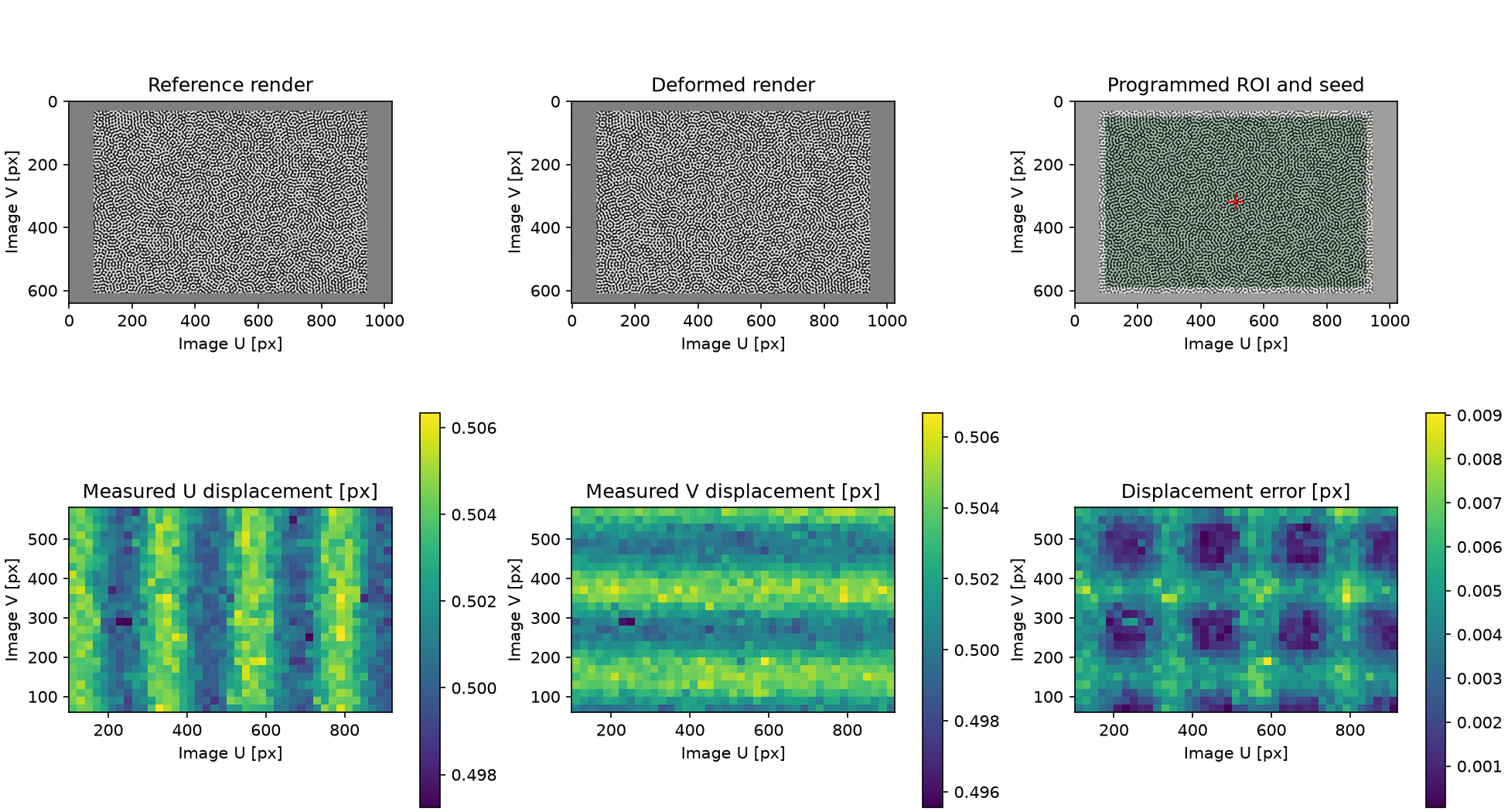
8. Plot the render, ROI, displacement, and error
figure, axes = plt.subplots(2, 3, figsize=(13, 7), constrained_layout=True)

axes[0, 0].imshow(reference, cmap="gray")
axes[0, 0].set_title("Reference render")
axes[0, 1].imshow(deformed, cmap="gray")
axes[0, 1].set_title("Deformed render")
axes[0, 2].imshow(reference, cmap="gray")
axes[0, 2].imshow(roi.mask, cmap="Greens", alpha=0.25)
axes[0, 2].plot(roi.seed[0], roi.seed[1], "r+", markersize=10)
axes[0, 2].set_title("Programmed ROI and seed")

u_plot = axes[1, 0].pcolormesh(
    dic_results.ss_x,
    dic_results.ss_y,
    dic_results.u_px[0],
    shading="auto",
)
axes[1, 0].set_title("Measured U displacement [px]")
figure.colorbar(u_plot, ax=axes[1, 0])

v_plot = axes[1, 1].pcolormesh(
    dic_results.ss_x,
    dic_results.ss_y,
    dic_results.v_px[0],
    shading="auto",
)
axes[1, 1].set_title("Measured V displacement [px]")
figure.colorbar(v_plot, ax=axes[1, 1])

error_magnitude = np.hypot(
    dic_results.u_px[0] - TARGET_DISPLACEMENT_PX,
    dic_results.v_px[0] - TARGET_DISPLACEMENT_PX,
)
error_plot = axes[1, 2].pcolormesh(
    dic_results.ss_x,
    dic_results.ss_y,
    error_magnitude,
    shading="auto",
)
axes[1, 2].set_title("Displacement error [px]")
figure.colorbar(error_plot, ax=axes[1, 2])

for axis in axes.flat:
    axis.set_aspect("equal")
    axis.set_xlabel("Image U [px]")
    axis.set_ylabel("Image V [px]")

figure_path = output_dir / "dic_ex04_render_to_dic.png"
figure.savefig(figure_path, dpi=150)
plt.close(figure)
print(f"Render and DIC outputs written to {output_dir}")
The top row shows the rendered image pair and the programmed rectangular ROI. The bottom row shows the recovered U and V displacement fields and their error relative to the analytic half pixel translation.