Note
Go to the end to download the full example code.
Stereo DIC and strain calculation of a plate with a hole
This example demonstrates how to perform stereo DIC using pyvale. The example uses synthetic images generated using Riley from a known calibration and deformation field. The calibration parameters are loaded from a text file, and the DIC calculation is performed on the reference and deformed images.
We can use the same calibration parameters as before:
calib_params = calib.loadtxt(dataset.dic_ex09_stereo_calibration(), delimiter=",")
The dataset module provides access to the synthetic images used in this
example. These functions return Path objects pointing to TIFF files bundled
with pyvale. The reference helpers return a concrete image path, while the
deformed-image helpers return a wildcard path pattern. For example,
def0 resolves to a path ending in hole_cam0_frame*.tiff.
During dic.calculate_3d pyvale expands each deformed-image wildcard with
glob and sorts the matching filenames. The sorted camera 0 and camera 1
lists are then processed as synchronized stereo frame pairs, so the image
naming must leave both cameras with the same number of frames in the same
order. To avoid wildcard discovery, you pass an explicit list[Path] for each
camera instead.
ref0 = dataset.dic_plate_with_hole_cam0_ref()
ref1 = dataset.dic_plate_with_hole_cam1_ref()

# deformed images
def0 = dataset.dic_plate_with_hole_cam0_def()
def1 = dataset.dic_plate_with_hole_cam1_def()

# Deformed images can be supplied either as wildcard Path objects, as above,
# or as explicit lists of image paths, for example:
# def0 = [Path("cam0_frame00.tiff"), Path("cam0_frame01.tiff"), ...]
# def1 = [Path("cam1_frame00.tiff"), Path("cam1_frame01.tiff"), ...]

# Build ROI using cam 0 reference image
roi = dic.RegionOfInterest(ref0)
roi.read_yaml(dataset.dic_ex10_roi())
# roi.interactive_selection()
# create an output directory
output_path = Path.cwd() / "pyvale-output" / "dic_ex10"
if not output_path.is_dir():
    output_path.mkdir(parents=True, exist_ok=True)
To perform the stereo DIC calculation, pass the two camera references as
[cam0_reference, cam1_reference] and the two deformed-image inputs as
[cam0_deformed, cam1_deformed]. In this example the deformed inputs are
wildcard Path objects, so pyvale discovers all matching frames for each
camera before starting the calculation. The calibration parameters describe
the relationship between the two camera views. The remaining arguments are
the same as dic.calculate_2d.
dic.calculate_3d(reference=[ref0, ref1],
                 deformed=[def0, def1],
                 calibration=calib_params,
                 roi_mask=roi.mask,
                 seed=roi.seed,
                 subset_size=31,
                 subset_step=10,
                 output_basepath=output_path)
Perform a strain calculation on the stereo DIC results:
strain.calculate_3d(data=output_path / "dic_results*",
                    window_size=5,
                    window_element = 9,
                    strain_formulation="ALMANSI",
                    output_basepath=output_path)
import the results:
strain_files = output_path / "strain_*.csv"
strain_results = strain.import_3d(data=strain_files, delimiter=",", binary=False)
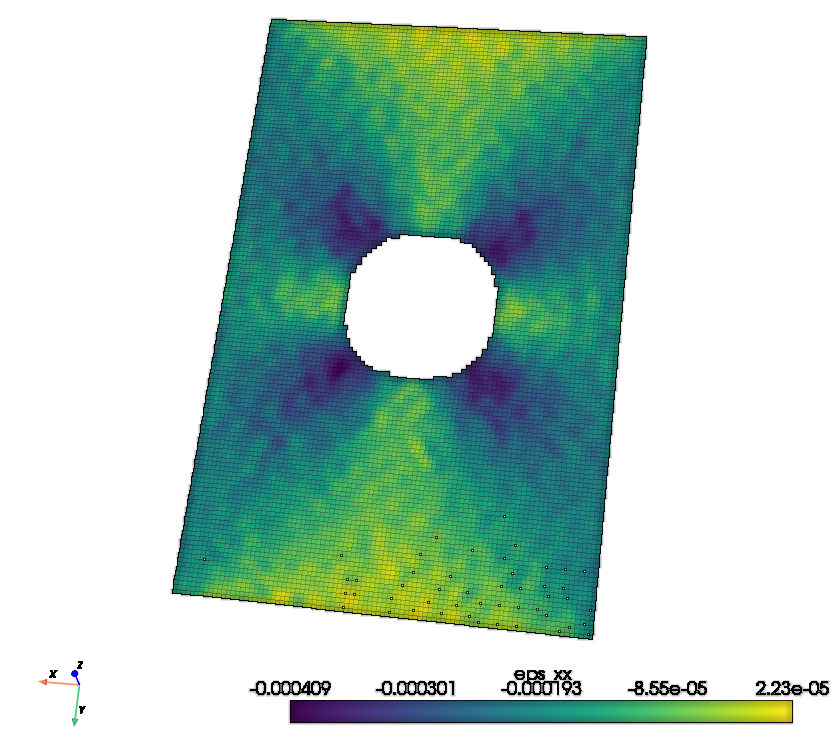
plot a 3d reconstruction using pyvista
import pyvista as pv

frame = 2


points = np.column_stack((
    np.ravel(strain_results.x_mm[frame]),
    np.ravel(strain_results.y_mm[frame]),
    np.ravel(strain_results.z_mm[frame])
))

cloud = pv.PolyData(points)
cloud["eps_xx"] = np.ravel(strain_results.eps_xx[frame])
cloud.plot(
    scalars="eps_xx",
    eye_dome_lighting=True,
)